Building a Serverless Visitor Counter with Lambda and DynamoDB
Part 7 of the AWS Cloud Resume Challenge.
With the frontend of the website fully secured and cost monitoring configured, the next step was adding the first dynamic feature to the project: a visitor counter.
This feature is a core component of the AWS Cloud Resume Challenge because it demonstrates how data flows through a modern cloud architecture. A request begins in the user's browser, triggers backend logic, updates a database, and returns a result to the frontend.
To build this feature, I implemented a serverless architecture using the following AWS services:>- Amazon DynamoDB to store the visitor count
- AWS Lambda to process the request and update the database
Architecture Overview
The visitor counter uses a simple serverless workflow:User Browser -> Lambda Function URL -> AWS Lambda -> DynamoDB -> Updated count returned to browser
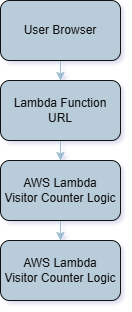 Serverless architecture used to implement the visitor counter.
Step 1 - Setting Up the Database (DynamoDB)
The first step was creating a place to store the visitor count. For this I used Amazon DynamoDB, AWS's fully managed NoSQL database service.
DynamoDB is designed for high availability and low latency, making it well suited for lightweight application data such as a visitor counter. I created a table called:cloud-resume-stats
The table was configured with the following key:
- Partition Key:
id(String)
id: visitorscount: 0
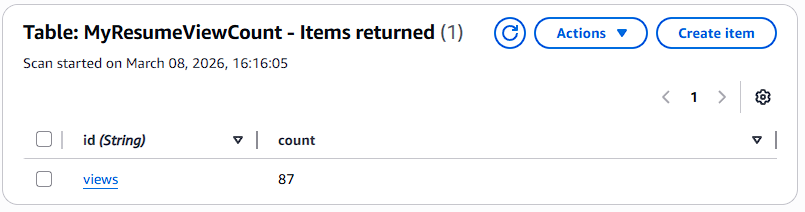 Initial visitor counter record stored in DynamoDB.
Step 2 - Writing the Backend Logic (AWS Lambda)
Next I created an AWS Lambda function responsible for updating the visitor count.
Lambda allows code to run in response to events without provisioning or managing servers. The function executes only when triggered, making it efficient and cost effective for small workloads like this. The function was written in Python using theboto3 library, which is the AWS SDK for Python.
The Lambda function performs three main tasks:
- Connect to the DynamoDB service
- Increment the visitor count stored in the table
- Return the updated value to the caller
update_item operation with an update expression.
This allows DynamoDB to handle the increment operation safely.
Why this matters: if multiple users load the website at the same time, DynamoDB ensures the counter increments correctly without race conditions or lost updates.
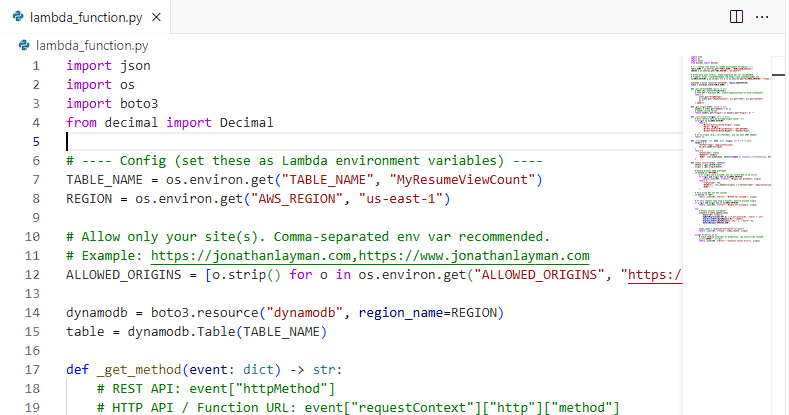 Lambda function written in Python that increments the visitor counter stored in DynamoDB.
Step 3 - Securing the Connection with IAM
By default, a Lambda function cannot access other AWS services. Permissions must be explicitly granted through an IAM role.
Each Lambda function runs with an execution role that defines what resources the function can interact with. To follow the Principle of Least Privilege, I created a custom IAM policy granting only the permissions required for the visitor counter.The policy allows the following actions:
dynamodb:GetItemdynamodb:UpdateItem
After attaching the policy to the Lambda execution role, I tested the function using the Lambda test feature to confirm it could successfully update the database.
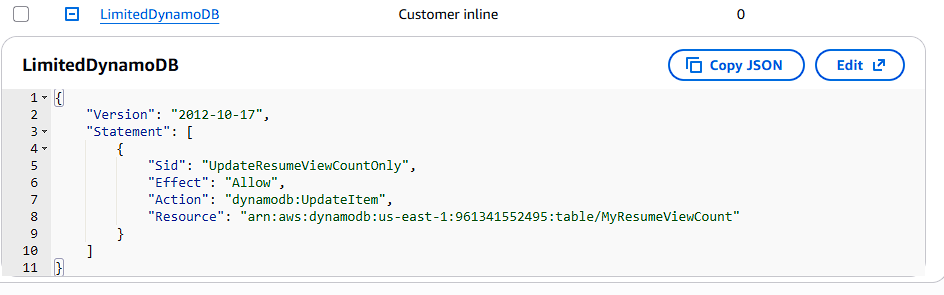 IAM policy granting the Lambda function permission to update the DynamoDB table.
Step 4 - Creating an Endpoint for the Frontend
In order for the website to trigger the Lambda function, the browser needs a public HTTP endpoint. Instead of exposing the Lambda function directly, I created an endpoint using Amazon API Gateway. API Gateway acts as the entry point for HTTP requests and forwards those requests to the Lambda function.
Using an HTTP API in API Gateway provides a clean and scalable way for frontend applications to communicate with serverless backend services. When a visitor loads the website, the browser sends a request to the API Gateway endpoint. API Gateway then triggers the Lambda function, which updates the visitor counter stored in DynamoDB and returns the updated value to the browser.
Because the website is hosted on a different domain than the API endpoint, I configured CORS (Cross Origin Resource Sharing). CORS allows browsers to safely make requests between different domains. To restrict access and follow security best practices, the API endpoint was configured with the following settings:
- Allowed Method: GET
- Allowed Origin: https://jonathanlayman.com
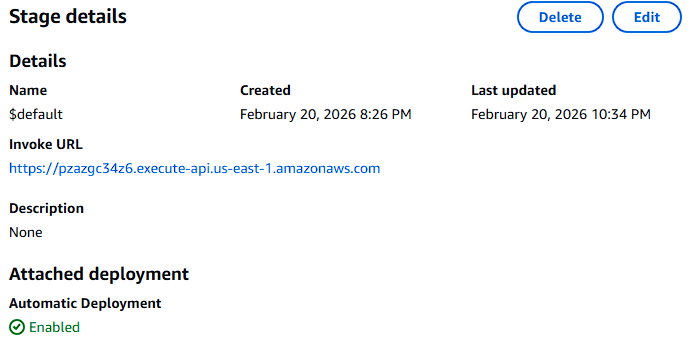 API Gateway HTTP endpoint used by the website to trigger the Lambda visitor counter.
Step 5 - Integrating the Counter with the Frontend
With the backend complete, the final step was connecting the visitor counter to the website.
I added a small JavaScript script that runs when the page loads.
The script performs three actions:
- Sends a request to the Lambda Function URL
- Waits for the JSON response containing the updated visitor count
- Updates the visitor counter displayed on the page
- The browser sends a request to the Lambda endpoint
- Lambda increments the value stored in DynamoDB
- The updated visitor count is returned to the browser
- The page displays the updated value
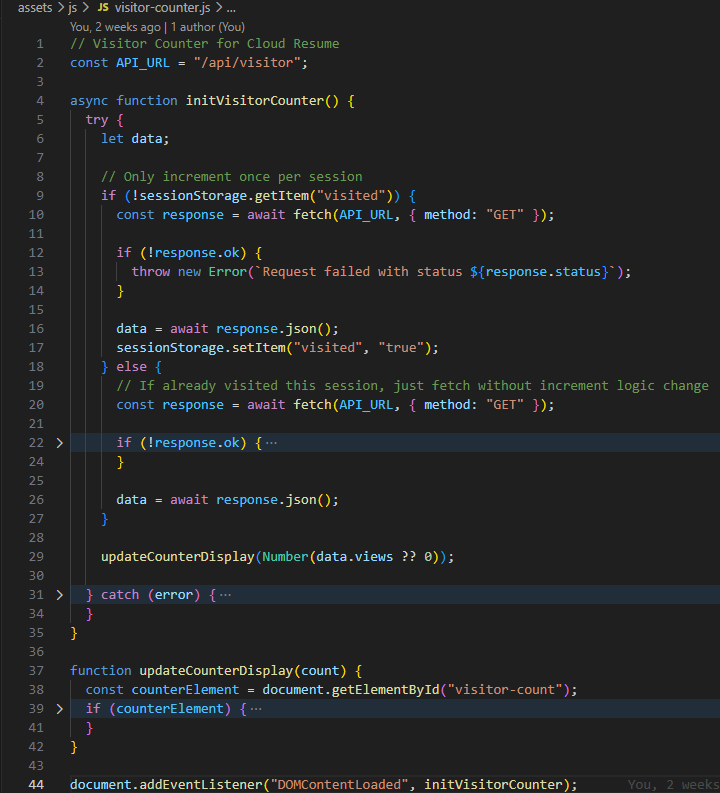 Frontend JavaScript calling the Lambda endpoint and displaying the visitor count.
Result
The website now includes a fully functional serverless visitor counter.The final architecture looks like this:
User Browser -> Lambda Function URL -> AWS Lambda -> DynamoDB -> Updated visitor count returned to the browserEach time the page loads, the counter increments automatically.
What Is Next
Up to this point most of the infrastructure for this project was created manually through the AWS console. This approach is often referred to as ClickOps.
While this method works well for learning, production environments rely on Infrastructure as Code to ensure infrastructure is reproducible, version controlled, and easier to maintain.
In the next stage of the project I begin converting the infrastructure into code using Terraform. This will allow the entire environment including Lambda, DynamoDB, and supporting services to be managed through configuration files rather than manual setup.
Next Up: Infrastructure as Code - Rebuilding the Project with Terraform